

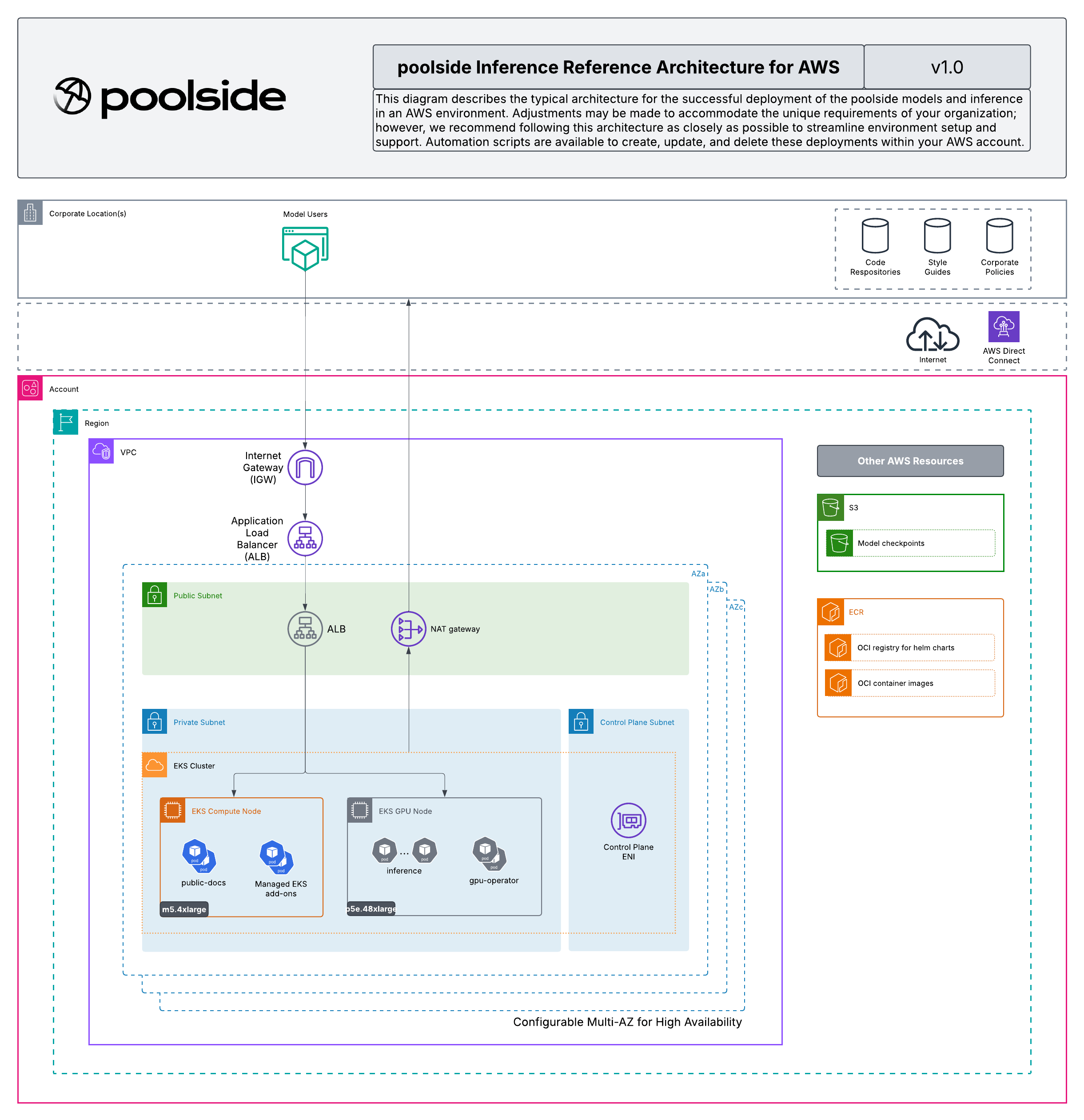
inference chart runs on, the diagram for that foundation, and the opinions that distinguish it from a generic EKS install.
You provision the AWS infrastructure. Poolside provides the deployment bundle with the inference Helm chart, and an optional Terraform reference stack that provisions the same foundation. You can apply the Terraform as published, fork it, or reproduce the architecture by hand against your own infrastructure-as-code standards. In every case the same chart from the bundle installs onto the resulting cluster.
The reference architecture is published in the poolsideai/reference_architectures repository, alongside the Terraform modules, example roots, and supporting documentation.
Architecture
Network
A VPC with public and private subnets across multiple availability zones:- Public subnets: the internet-facing Application Load Balancer, when you expose models outside the VPC.
- Private worker subnets: the EKS worker nodes, with outbound internet through NAT gateways.
EKS cluster
A managed Kubernetes cluster, version 1.29 or later, with an IAM OIDC provider enabled. The OIDC provider is what makes IRSA work, so the model servers read checkpoints from S3 without static credentials.GPU node group
A GPU node group with enough GPU memory for the models you deploy, running an EKS-optimized GPU AMI and the NVIDIA GPU Operator so each node advertises thenvidia.com/gpu resource. The reference architecture sets p5e.48xlarge as the minimum instance type for the supported model performance profile. p5en.48xlarge and p5.48xlarge are the other supported shapes.
A p5e.48xlarge node provides eight H200 GPUs. You place models on the node by GPU count rather than by instance: each model’s gpus value reserves that many GPUs, and several models share a node until its GPUs are used up. The install example packs Laguna M, Laguna XS, and Point onto one node as four, one, and one of the eight GPUs. To size a model, match its minimum GPU memory in the per-GPU memory table against the node’s GPUs.
Node volume sizing
Size each GPU node’s root volume for what the model servers stage locally, not only for the operating system and image. On startup, a model server downloads its entire checkpoint, which is tens of GB, onto the node, on top of the atlas image. A default-sized node volume can fill before the pod becomes ready. The reference deployment uses a 300 GB node volume.
Scheduling under the GPU taint
The GPU nodes carry the nvidia.com/gpu=true:NoSchedule taint, which has two scheduling consequences. Provision a separate non-GPU node group for the cluster controllers that are not GPU workloads, such as the AWS Load Balancer Controller and the GPU Operator’s controller, so they have somewhere to run. Configure the GPU Operator’s node-level components, including its Node Feature Discovery worker, to tolerate the taint, or they cannot run on the GPU nodes and the nodes never advertise the nvidia.com/gpu resource.
Capacity
The supported GPU instances are in high demand and are usually not available on demand. To guarantee an instance, reserve capacity before you create the node group, either an On-Demand Capacity Reservation or an EC2 Capacity Block for ML, then launch the node group into the reservation.
- The reference Terraform consumes a reservation for you: set the capacity reservation or capacity block input on the GPU node group, and the launch template targets it.
- If you provision the node group yourself, target the reservation explicitly in the node group’s launch template. A managed node group does not consume a Capacity Reservation unless its launch template names that reservation, and a RAM-shared targeted reservation from another account is not consumed automatically.
Object storage and registry
- Amazon S3 for the model checkpoints, with server-side encryption using a customer-managed KMS key.
- Amazon ECR for the
atlasinference container image, with pulls authorized by the GPU node group’s instance role.
Ingress and TLS
The AWS Load Balancer Controller reconciles the per-modelIngress objects into a shared Application Load Balancer. The load balancer terminates TLS with an AWS Certificate Manager certificate that covers the model hostnames.
Access
IRSA on the sharedinference service account grants the model servers read-only access to the checkpoint bucket and decrypt access to its KMS key, and nothing else.
Key opinions
The reference architecture commits to the following decisions. They distinguish it from a generic Amazon EKS install. If you reproduce the architecture by hand, follow them to stay aligned with what Poolside support and the rest of this documentation expect.- IRSA for object storage: the model servers reach S3 through an IAM role assumed by the
inferenceservice account, not a mounted credentials secret. - ALB ingress: traffic enters the cluster through the AWS Load Balancer Controller, which provisions one shared Application Load Balancer for all models.
- Customer-managed KMS key for S3: the checkpoint bucket uses SSE-KMS with a key you control, and the IRSA policy grants decrypt access to that key.
- Minimum GPU instance type
p5e.48xlarge: required for the supported model performance profile.
Use the reference architecture
You can use the reference architecture in three ways:- Apply it directly: Clone the repository, configure the example for your environment, and run
terraform apply. - Fork it: Take the example as a starting point and adapt the inputs, modules, or wrapper to your standards.
- Reproduce it by hand: Use the architecture and the opinions on this page as a specification, and build the equivalent foundation in your own infrastructure-as-code.
poolsideai/reference_architectures repository.